
Escaping the Void:
Wrapping My Vulkan Window in ImGui
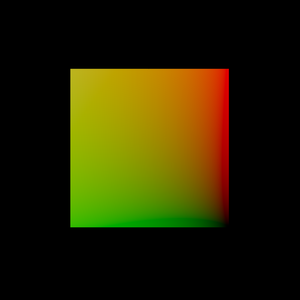
If you’ve ever braved the Khronos Group’s Vulkan Tutorial, you know the rite of passage: writing roughly 1,600 lines of C++ just to convince a GPU to draw a single triangle (or in my case, a humble quad) inside a GLFW window. Follow Brendan Galea’s fantastic series down the rabbit hole, and you get to break that monolith into about eight tidy classes and suddenly, you’re importing with TinyOBJLoader and rendering smooth and faceted vases bathed in glorious point lights (six of them, because why stop at one?).
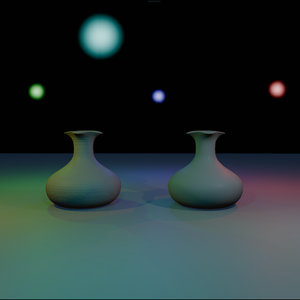
It’s a thrilling moment when pixels finally hit the screen. I started my humble adventure with a simple forward renderer drawing directly to the swap chain, split into thin wrappers that each guarded one piece of this Vulkan beast:
| Class | What It Guards |
| ReWindow | The GLFW window and its surface (1600×900) |
| ReDevice | Instance, physical/logical devices, queues, and the command pool |
| ReSwapChain | Swap chain images, depth buffers, the main render pass, and sync objects |
| ReRenderer | Per-frame command buffers (beginFrame, beginSwapChainRenderPass, endFrame) |
| RePipeline | Graphics pipelines forged from SPIR-V shaders |
| ReModel, ReBuffer | OBJ meshes (vertex/index buffers) and mapped uniform buffers |
| ReDescriptors | Builders for descriptor pools, layouts, and writers |
Perched atop this foundation were two render systems:
RenderSystem_Simple for lit meshes, and RenderSystem_PointLight for six colorful point-light billboards orbiting two vases on a floor quad, all navigated by a trusty keyboard camera controller.
The frame loop was classic and predictable: poll events, update the camera, write the global UBO, begin the swap chain render pass, draw, and present. The 3D scene filled the entire window.
It worked!
It was fast!
But it was completely trapped in code.
If I wanted to import new meshes, nudge a light to the left, or build an actual scene, I had to hardcode values and recompile. To turn a rendering demo into an actual game engine, I needed a proper command center.
I needed structure and I needed an editor, so I broke open my copy of Game Engine Architecture (3rd edition) by Jason Gregory and started digging into Chapter 6: Engine Support Systems.
Building the Command Center
RoboEngine’s very first commit transforms that raw Vulkan window into an interactive editor. The secret? Stop rendering the 3D scene directly to the screen. Instead, render the scene into an offscreen image, then unleash Dear ImGui to draw a full, dockable editor interface, complete with a Scene Tree, an Inspector, and a central Viewport panel that samples our offscreen 3D world like a texture.
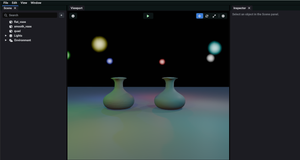
Starting with the editor shell was a deliberate tactical choice. Every system I build next (lights, materials, gizmos, play mode) will immediately have a home where I can inspect and tweak it live, rather than recompiling every time I want to move a lamp two inches.
Side Quest Note: This first commit also smuggled in an EnTT Entity-Component-System (ECS) framework with JSON scene saving and loading! To keep this blog post focused, we’re sticking strictly to the window-to-editor leap today – we’ll dive into the EnTT dungeons in the next post.
The Architecture:
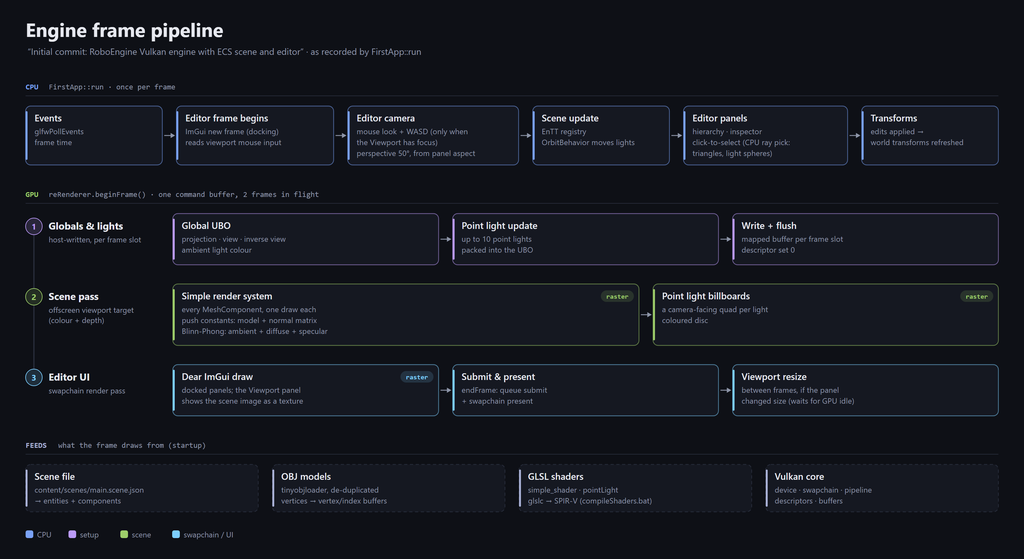
Two Passes Per Frame
The big architectural twist is that the 3D scene renderer no longer owns the GLFW window. Each frame now records two distinct render passes into the same command buffer:
- Pass 1: The 3D scene renders into an offscreen image.
- Pass 2: ImGui renders the editor UI into the swap chain, sampling that offscreen image right inside the Viewport panel.
And here is how the pieces snapped together:
1. The Offscreen Canvas (ReViewportTarget)
I forged a new class, ReViewportTarget, to own a color image, a depth image, a framebuffer, and its own dedicated render pass. By creating the color image with COLOR_ATTACHMENT | SAMPLED usage and ending its render pass in SHADER_READ_ONLY_OPTIMAL, ImGui can sample the 3D scene directly without needing an extra layout transition barrier:
colorAttachment.initialLayout = VK_IMAGE_LAYOUT_UNDEFINED;

// Left ready for the UI to sample immediately
colorAttachment.finalLayout   = VK_IMAGE_LAYOUT_SHADER_READ_ONLY_OPTIMAL;
Even better, this render pass is built once and never destroyed. When the Viewport panel resizes, only the underlying images and framebuffer are rebuilt, meaning all my mesh and point-light pipelines stay completely valid.
To keep the GPU from tripping over itself, two subpass dependencies handle synchronization: the first waits for the previous frame’s UI reads and depth writes to finish before clearing, and the second ensures our new color writes are visible to the UI’s fragment shader:
dependencies[1].srcSubpass    = 0;
dependencies[1].dstSubpass    = VK_SUBPASS_EXTERNAL;
dependencies[1].srcStageMask  = VK_PIPELINE_STAGE_COLOR_ATTACHMENT_OUTPUT_BIT;
dependencies[1].srcAccessMask = VK_ACCESS_COLOR_ATTACHMENT_WRITE_BIT;
dependencies[1].dstStageMask  = VK_PIPELINE_STAGE_FRAGMENT_SHADER_BIT;
dependencies[1].dstAccessMask = VK_ACCESS_SHADER_READ_BIT;
2. Summoning ImGui (ReEditor)
I pulled in Dear ImGui’s docking branch and compiled it as a static library alongside its GLFW and Vulkan backends. ReEditor spins up the ImGui context, unlocks docking and keyboard navigation, and hooks both backends directly into my existing Vulkan device and swap chain render pass:
ImGui_ImplVulkan_InitInfo initInfo{};
initInfo.ApiVersion                  = VK_API_VERSION_1_0;
initInfo.Instance                    = reDevice.getInstance();
initInfo.PhysicalDevice              = reDevice.getPhysicalDevice();
initInfo.Device                      = reDevice.device();
initInfo.QueueFamily                 = reDevice.findPhysicalQueueFamilies().graphicsFamily;
initInfo.Queue                       = reDevice.graphicsQueue();
initInfo.DescriptorPoolSize          = 64; // Let the backend manage its own pool
initInfo.MinImageCount               = 2;
initInfo.ImageCount                  = std::max(2u, renderer.getSwapChainImageCount());
initInfo.PipelineInfoMain.RenderPass = renderer.getSwapChainRenderPass();
Giving ImGui its own DescriptorPoolSize keeps the engine’s global descriptor pool clean and strictly dedicated to per-frame UBOs.
3. Framing the World in a Panel
Registering the offscreen color view with ImGui’s Vulkan backend hands back a VkDescriptorSet that moonlights as an ImTextureID:
viewportTexture = ImGui_ImplVulkan_AddTexture(colorView, VK_IMAGE_LAYOUT_SHADER_READ_ONLY_OPTIMAL);Inside the Viewport panel, we simply measure the available space, record how large the Viewport wants to be, and draw the texture:
ImVec2 size = ImGui::GetContentRegionAvail();
desiredViewportExtent = { uint32_t(size.x), uint32_t(size.y) };
ImGui::Image(reinterpret_cast<ImTextureID>(viewportTexture), size);
On a fresh launch (before an imgui.ini layout file exists), ImGui’s DockBuilder API automatically carves the main dockspace into a classic layout: Scene Tree on the left (18%), Inspector on the right (25%), and our live Viewport taking center stage.
4. The Upgraded Frame Loop
With both passes wired up, the heartbeat of the engine looks like this:
editor->beginFrame();            // ImGui NewFrame + capture viewport input
// ...update camera & scene behaviors...
editor->draw(scene, camera);     // Build UI panels
editor->endFrame();              // ImGui::Render()

if (auto cmd = reRenderer.beginFrame()) {
    viewportTarget->beginRenderPass(cmd);   // Pass 1: 3D scene -> offscreen image
    simpleSystem.render(frameInfo);
    pointLightSystem.render(frameInfo);
    viewportTarget->endRenderPass(cmd);

    reRenderer.beginSwapChainRenderPass(cmd); // Pass 2: Editor UI -> swap chain window
    editor->render(cmd);
    reRenderer.endSwapChainRenderPass(cmd);
    reRenderer.endFrame();
}

// Post-frame: resize the offscreen target if the Viewport panel changed size
And of course, the camera’s aspect ratio now tracks the Viewport panel’s dimensions rather than the outer window!
Traps & Mobs Along the Way
No engine adventure happens without a few ambushes. Here are the five sharpest lessons from this leg of the journey:
Never resize mid-frame
- You don’t know the Viewport panel’s new size until ImGui builds it – at which point this frame’s UI draw commands are already referencing the current offscreen texture.
- Resizing happens safely after endFrame(): wait for the GPU to idle, rebuild the images, and hand ImGui the fresh view.
Bonus trap:
- Collapsing or hiding a panel reports a 0×0 extent, which must be skipped unless you want Vulkan yelling at you over zero-sized images.
VkExtent2D desired = editor->getDesiredViewportExtent();
VkExtent2D current = viewportTarget->getExtent();

if (desired.width > 0 && desired.height > 0 && (desired.width != current.width || desired.height != current.height))
{
    // Calls vkDeviceWaitIdle inside
    viewportTarget->resize(desired);

    // RemoveTexture + AddTexture
    editor->setViewportImage(viewportTarget->getColorView());
}
The sRGB washout curse.
ImGui’s default color palette is authored in sRGB space. Rendering it into an *_SRGB swap chain applies gamma encoding a second time, leaving the UI looking pale and ghostly. Converting every ImGui style color to linear space once at startup cures it immediately:
// Linear color conversion - banish the pale UI!
for (int i = 0; i < ImGuiCol_COUNT; i++)
{
    ImVec4 &c = style.Colors[i];
    c.x = std::pow(c.x, 2.2f);
    c.y = std::pow(c.y, 2.2f);
    c.z = std::pow(c.z, 2.2f);
Input belongs to the panel, not the window:
- Once UI panels enter the picture, raw GLFW keyboard polling will happily fly your camera across the map while you’re trying to type a number into the Inspector.
- Now, camera flight only activates when the Viewport is focused or while right-dragging.
- Right-clicking inside the Viewport locks and hides the cursor (GLFW_CURSOR_DISABLED with raw motion) for smooth, unlimited mouselook.
Destruction order is sacred.
- In FirstApp, the viewport target is declared before the editor, ensuring C++ destroys the editor first.
- ReEditor’s destructor waits on the device, unregisters the viewport texture, and shuts down the ImGui backends while the underlying offscreen image is still alive and well.
Clicking into the 3D world.
- To let me actually select objects in the Viewport, I added CPU ray-casting: a click converts into 0–1 UV coordinates inside the panel, projects into a world-space ray, and tests against mesh triangles and light spheres.
- Even better, the selection wireframe box is drawn right on top using ImGui’s 2D draw list by projecting the bounding box’s eight corners—zero extra render passes required!
What’s Next on the Map?
Now that we have panels to click on and a world we can inspect, the next commit tackles a superpower every creator takes for granted until they have to build it themselves: Undo/Redo. Every Inspector tweak, re-parent, creation, and deletion needs to become a reversible command.
In the coming posts, I’ll break down how that command history works alongside the EnTT scene and component reflection table that landed in this very first commit.
Onward!