
Bringing the World to Life:
glTF and Skeletal Meshes
Static statues and orbiting point lights are great, but nothing screams “real game engine” quite like watching an animated creature trot across your viewport, casting a real-time shadow while bathed in PBR reflections.
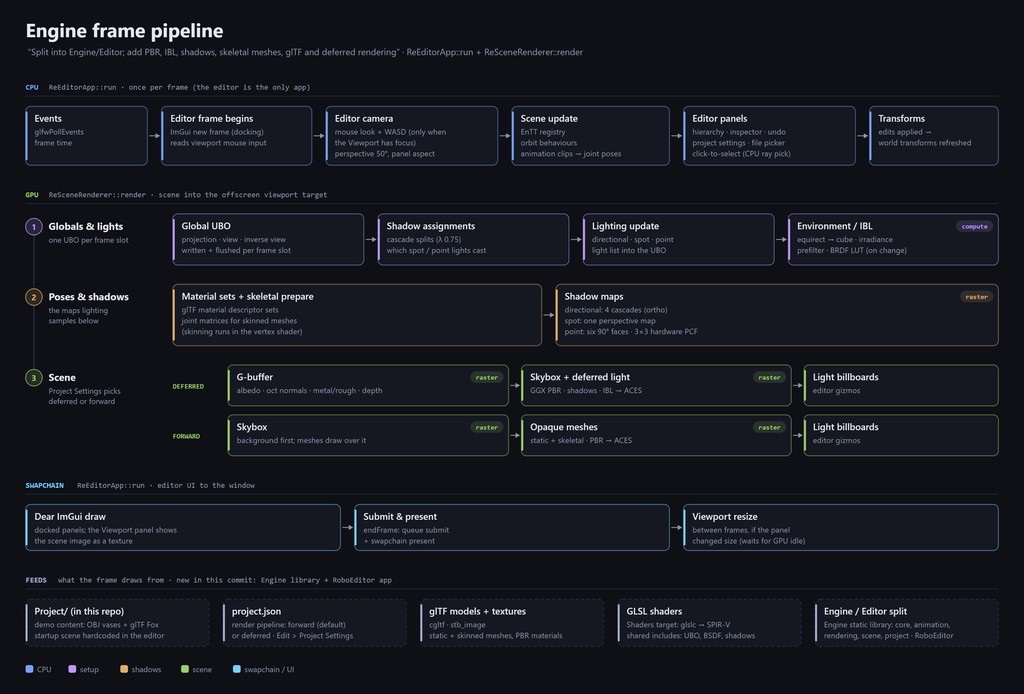
Today, we reach the grand finale of our three-part trilogy on commit 18dd4b4! In DevBlog #7 we split the Engine from the Editor; in DevBlog #8 we lit the forge with PBR, IBL, and shadows; and now, in DevBlog #9, we’re breathing motion into the world through glTF 2.0 loading, CPU keyframe animation, and GPU-skinned skeletal meshes.
To keep things fast and clean, the workload divides neatly across the hardware:
- Load time: Parse the glTF file once and build the skeleton hierarchy.
- Every frame (CPU): Advance the animation clock and pose the joints.
- Every frame (GPU): Blend vertex positions and normals in the vertex shader.
Loading glTF 2.0 with cgltf
To bring modern 3D assets into Robo Engine, I pulled in cgltf v1.15 using the exact same zero-friction, local-or-download CMake pattern we used for EnTT, with stb_image tagging along to decode embedded or external textures.
A tiny RAII wrapper, Gltf::File, owns the parsed cgltf_data pointer and guarantees cleanup the moment it leaves scope:
class File
{
public:
    // Throws std::runtime_error if the file can't be read or isn't valid glTF
    explicit File(const std::string &path);
    ~File();

    const cgltf_data &data() const { return *data_; }
    // ...
};
Both our static and skeletal mesh loaders share Gltf::File, backed by helpers for node transforms, vertex attribute extraction, PBR material import, and automatic smooth normal generation for meshes that ship without them.
Because glTF lives in a Y-up world while Robo Engine stands tall in +Z-up, imported geometry receives our trusty +90° rotation around the X-axis: (x, y, z) → (x, −z, y). Base color, metallic-roughness, and normal maps wire straight into the PBR material pipeline we built in DevBlog #8—and to put it all through its paces, the classic animated glTF Fox sample (Fox.glb) officially joined our vases demo scene!
Posing the Skeleton on the CPU
re_skeleton.hpp stays purely on the CPU side. A skeleton is simply a flat vector of Joints ordered parents-first, where each joint stores its parent index, a rest pose (translation, rotation, scale), and an inverse bind matrix. Animation clips hold channels that drive individual joints using step or linear keyframes:
struct Joint
{
    std::string name;
    int       parent = -1;     // Index of the parent joint (always lower); -1 = root
    glm::mat4 offset{1.0f};    // Fixed transform from non-joint nodes between parent and joint
    glm::mat4 inverseBind{1.0f};

    // Rest pose, relative to the parent
    glm::vec3 translation{0.0f};
    glm::quat rotation{1.0f, 0.0f, 0.0f, 0.0f};
    glm::vec3 scale{1.0f};
};
Every frame, posing follows a clean four-step recipe:
- Start from the skeleton’s rest pose.
- Overwrite any channels animated by the active clip at time
t. - Walk the joints front-to-back to compute world matrices—because parents always precede children, one linear pass handles the entire hierarchy without recursion.
- Multiply
world × inverseBindto produce the final skinning matrices.
The animation system advances each SkeletalMeshComponent’s clock by dt × speed, either wrapping smoothly with std::fmod for looping clips (even supporting negative speeds to play animations in reverse!) or clamping cleanly at the endpoints for one-shot clips:
mesh.time += dt * mesh.speed;
if (mesh.loop)
{
    mesh.time = std::fmod(mesh.time, clip->duration);
    if (mesh.time < 0.0f) { mesh.time += clip->duration; } // Negative speed plays backwards!
}
else if (mesh.time >= clip->duration || mesh.time < 0.0f)
{
    mesh.time    = mesh.time >= clip->duration ? clip->duration : 0.0f;
    mesh.playing = false;
}
computeSkinMatrices(mesh.model->getSkeleton(), clip, mesh.time, mesh.skinMatrices);
GPU Skinning:
Bending Vertices in the Shader
Once the CPU finishes computing the joint matrices, the GPU takes over the heavy lifting. Every skinned vertex carries up to four joint indices and four blend weights summing to 1.0. Inside the vertex shader, linear blend skinning combines those transforms on the fly:
layout(std430, set = SKINNING_SET, binding = 0) readonly buffer SkinMatrices
{
    mat4 skinMatrices[];
};

mat4 skinMatrix(uvec4 joints, vec4 weights, uint jointBase)
{
    return skinMatrices[jointBase + joints.x] * weights.x +
           skinMatrices[jointBase + joints.y] * weights.y +
           skinMatrices[jointBase + joints.z] * weights.z +
           skinMatrices[jointBase + joints.w] * weights.w;
}
Every animated character drawn in a frame packs its matrices into one shared storage buffer, with each draw call simply passing its starting jointBase offset. Even better, skinned meshes plug directly into the rest of our rendering architecture: they write to the G-buffer in Deferred mode and run a dedicated skeletal_mesh_shadow.vert pass so our trotting fox casts a dynamic, animated shadow across the floor!
Traps & Dragons Along the Way
Turning the mesh isn’t enough—rotate the skeleton too! Joint animations and inverse bind matrices live in glTF’s Y-up space.
- Carrying a
fileToEnginetransform on the skeleton and baking it into the skinning output ensures the animated character stands upright in Robo Engine’s +Z-up world alongside static meshes.
Not every node in a glTF tree is a joint.
- Artists often group bones under plain transform nodes in DCC tools. Rather than bloating the runtime skeleton with non-joint nodes, the loader folds intermediate node transforms into each child joint’s static
offsetmatrix—keeping the runtime array lean and our single-pass hierarchy walk fast.
Parents-first is a loader contract.
- That recursion-free front-to-back pose loop only works if every joint’s
parentindex is strictly lower than its own. Since glTF files don’t guarantee topological ordering in their skin arrays, our loader sorts and remaps joints at import time so runtime posing never misses a beat.
Cubic-spline keys are approximated as linear.
- glTF supports cubic-spline keyframes with per-key in/out tangents. For now, our importer loads those keyframes as linear segments—dropping the tangents. At typical 30–60 FPS bake densities you can barely tell, though very sparse keyframes can look slightly brisk.
Missing normals get forged automatically.
- If a glTF primitive omits vertex normals, our loader generates smooth, area-weighted normals—accumulating each triangle’s unnormalized cross product (whose magnitude naturally scales with triangle area) onto its three corners before normalizing.
Next Up on the Quest
With the refactor officially conquered, RoboEngine now boasts a standalone runtime library, Forward and Deferred PBR rendering, HDR skies, dynamic shadows, and GPU-skinned animated characters!
There’s just one big visual frontier left untouched: so far, every single surface in our world is 100% opaque. In the next DevBlog, we’ll unlock transparency, complete with alpha-blended glass, alpha-cutout foliage, and cutout shadows so sunlight streams right through the gaps in leaves!