
Don’t Lose My Work!
Putting a Window Close on Hold
There is no heartbreak quite like spending twenty minutes carefully arranging point lights, hitting the window’s [X] button out of muscle memory, and watching your unsaved scene vanish into the ether without a peep.
ARGGGGG!!!
After wrapping up my GLFW source build, I had to fix that trap for good.
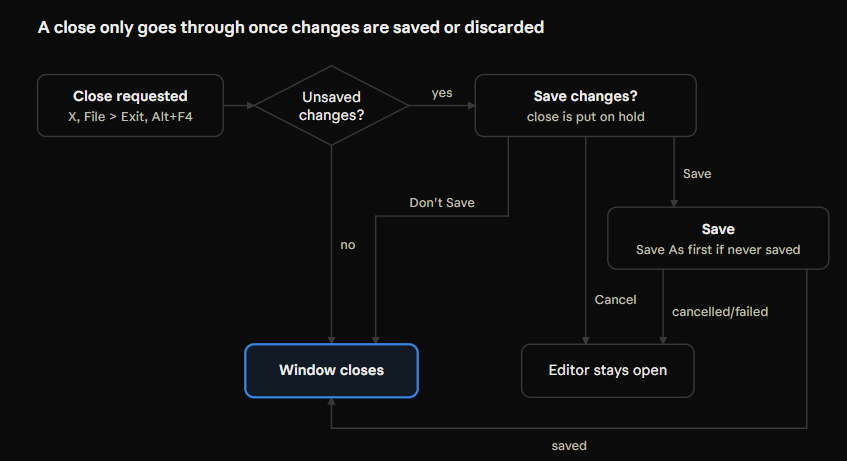
Now, attempting to close RoboEngine by any route: clicking the [X], choosing File → Exit, or hitting Alt+F4, will intercept the shutdown and pop up a proper Save / Don’t Save / Cancel dialog. Even better, New and Open share that exact same prompt, finally upgrading from a bare Discard / Cancel choice to include a real Save button.
The fun engineering puzzle here isn’t drawing a modal box; it’s teaching an immediate mode UI loop how to pause a shutdown, chain a Save As file picker in the middle of it, and gracefully back out if anything gets canceled along the way. Man, UI design is tough!
Before:
Close Meant Gone
In an earlier DevBlog, we introduced sceneDirty and an “Unsaved Changes” modal, but only New and Open bothered checking it. Even then, that dialog only offered Discard or Cancel, meaning if you actually wanted to keep your work, you had to cancel, manually save, and trigger your action all over again.
Meanwhile, closing the window checked nothing at all. Our main loop simply spun while (!reWindow.shouldClose()). The moment GLFW’s close flag flipped true, the loop exited and the app terminated, with that mocking * still sitting in the title bar.
The Upgrade:
Putting a Close on Hold
GLFW tracks window closure with a single boolean flag: clicking [X] sets it, and the main loop exits when it sees it. Instead of wrestling with GLFW callbacks, our editor inspects that flag once per frame and clears it before the main loop ever reaches its shouldClose() check.
1. Intercepting Every Exit Route
Every road to closing the app converges on that single GLFW flag: File → Exit calls glfwSetWindowShouldClose(window, GLFW_TRUE), while clicking [X] or pressing Alt+F4 sets it through the OS. One check inside drawFileDialogs() catches all three:
void ReEditor::interceptWindowClose()
{
    GLFWwindow *window = reWindow.getGlfWwindow();
    if (!glfwWindowShouldClose(window) || closeConfirmed || !sceneDirty)
        return;

    glfwSetWindowShouldClose(window, GLFW_FALSE); // Keep the main loop alive!
    if (pendingAction == PendingAction::None)     // Unless another prompt is already up
    {
        pendingAction = PendingAction::Close;
        confirmDiscardRequested = true;
    }
}
Because this runs during the ImGui frame, the close request is intercepted and neutralized before the loop checks shouldClose() at the top of the next iteration.
2. One State Machine for New, Open, and Close
In a previous DevBlog, PendingReplace { None, New, Open } evolved into PendingAction { None, New, Open, Close }. Whichever destructive action got paused now executes through one unified dispatcher:
void ReEditor::runPendingAction(ReScene &scene)
{
    switch (pendingAction)
    {
        case PendingAction::New:   newScene(scene); break;
        case PendingAction::Open:  openSceneFile(scene, pendingOpenPath); break;
        case PendingAction::Close:
            closeConfirmed = true; // Let our own close request pass through!
            glfwSetWindowShouldClose(reWindow.getGlfWwindow(), GLFW_TRUE);
            break;
        case PendingAction::None:  break;
    }
    pendingAction = PendingAction::None;
}
Notice closeConfirmed: without that latch, the close request issued by runPendingAction itself would get intercepted all over again on the very next frame!
3. Save / Don’t Save / Cancel
The upgraded modal asks: “vases.scene.json has unsaved changes. Save them before closing?” (or “before continuing?” for New and Open).
- [Don’t Save] immediately fires
runPendingAction(scene). - [Cancel] clears
pendingActionand drops you right back into the editor. - [Save] is the tricky path because an untitled scene has no file path on disk yet.
4. Chaining “Save As” Mid-Shutdown
If the scene already has a path, clicking Save writes the file and immediately runs the pending close/new/open action. If the scene is untitled, Save opens our ReFilePicker in Save As mode and raises a continueAfterSaveAs flag.
The pending close patiently waits across however many frames you spend browsing folders. To tell the difference between “still picking a file” and “user hit Cancel”, ReFilePicker gained an isOpen() helper:
if (filePicker.draw(chosen))
{
    // ...
    if (pickerPurpose == PickerPurpose::SaveAs)
    {
        const bool saved = saveSceneFile(scene, chosen);
        if (continueAfterSaveAs)
        {
            if (saved) { runPendingAction(scene); }          // Carry on with New / Open / Close
            else       { pendingAction = PendingAction::None; } // Write failed—abort and report in status bar
            continueAfterSaveAs = false;
        }
    }
}
else if (continueAfterSaveAs && !filePicker.isOpen())
{
    // The user cancelled Save As, so cancel the New / Open / Close too!
    continueAfterSaveAs = false;
    pendingAction = PendingAction::None;
}
The golden rule holds across every branch: the pending action only runs if the save actually succeeded. A failed disk write or a canceled picker leaves the editor open with your scene safe and still marked dirty.
Traps & Dragons Along the Way
Chaining modal dialogs across immediate-mode frames has a few sharp edges worth watching out for:
Latch your own close
- Once the user confirms Don’t Save (or the save succeeds),
runPendingActionsets GLFW’s close flag itself. WithoutcloseConfirmed,interceptWindowClose()would spotsceneDirty == trueand block your exit forever.
Don’t let a second request clobber the first
- If a New confirmation prompt is already on screen and you click the window’s [X],
interceptWindowClosestill clears GLFW’s close flag, but leavespendingActionset toNew. Only one question is ever active at a time, and it stays faithful to whichever action asked first.
“Not chosen yet” isn’t the same as “canceled”
ReFilePicker::draw()returnsfalseon every frame the modal is open, and on the frame it gets canceled. AddingisOpen()(which flips false when a file is confirmed or whenBeginPopupModalreports closure via Cancel orEscape) cleanly separates waiting from aborting.
Close one modal before opening the next
- Clicking Save on an untitled scene calls
ImGui::CloseCurrentPopup()before callingrequestSaveSceneAs(). Opening the file picker via a flag on the following frame ensures the two modals never fight over ImGui’s popup stack.
Re-saving the demo scene made a noisy Git diff
- Testing this meant saving
vases.scene.jsonstraight from the editor, which rewrote 380 lines of the file for three quirky reasons:nlohmann::jsonsorts object keys alphabetically by default (componentsbeforeid,MeshbeforeName).floatvalues serialize as full-precision doubles, turning0.1finto0.10000000149011612.- Because the scene was running live, the orbiting lights saved wherever they happened to be mid-orbit (and the vases had been nudged to
x = -1.01and1.03). None of it breaks loading, though switching tonlohmann::ordered_jsonand rounding float output would keep future scene diffs super clean.
Next Up on the Quest
Right now, assigning a 3D model to an entity’s MeshComponent still requires hand-editing a .scene.json file in a text editor. In our next DevBlog, we’ll tackle plugging a model file picker directly into the Inspector so any entity can swap meshes right inside RoboEngine!